 Anyx
Key takeaways
- Add Anyx to each WhatsApp group that matters: add it like a contact, tag it once and tell the members.
- Every group gets its own note by email: what needs your attention, what was decided, what is unanswered and who owes what.
- Anyx works on its own by default. At anyx.app/notes you can set each group's importance and write what it should focus on.
- Guidelines steer what Anyx highlights. They never let it send messages or close tasks for you.
To organize WhatsApp groups without reading every message, add Anyx to each group that matters. Anyx reads the conversation and emails you one short note per group: what needs your attention, what was decided, what is still unanswered and who owes what. By default it works on its own. If you want, tell it what matters in each group at anyx.app/notes.
Why do WhatsApp groups turn into chaos?
Groups mix everything. A customer approval, a supplier delay, a question asked twice and a thumbs-up all scroll past at the same speed. Pinning, muting and archiving help you find a chat. They do not tell you what happened inside it.
The cost shows up later: the question nobody answered, the delivery date nobody re-checked, the customer who mentioned the next job and never heard back. The information was in the group. It was message 38 of 47.
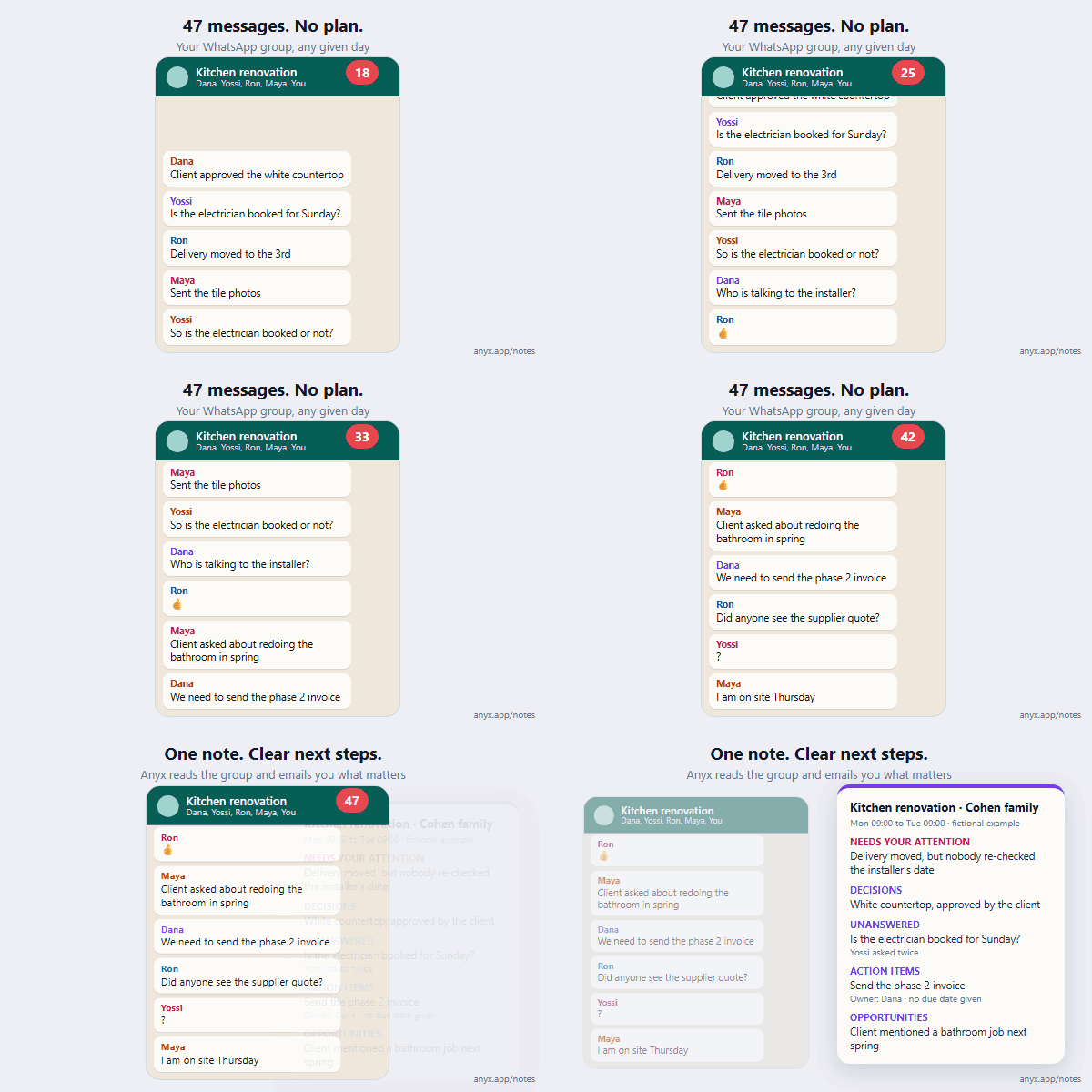
An AI Note sorts the conversation into sections such as Needs your attention, Decisions, Unanswered, Action items and Opportunities. Empty sections are left out. Items can name the person involved, an owner and a due date, and Anyx is designed to leave the date empty rather than guess one the chat did not give.
Which groups should you add Anyx to?
Start with the group you worry about most, then add the rest of the groups where something can fall through the cracks:
- Customer and project groups: approvals, open questions and promised dates.
- Supplier groups: offers, deadlines and deliveries that changed.
- Team and shift groups: who took what, and what nobody picked up.
- Personal groups: the family, a trip, the building committee. Personal commitments matter just as much as work.
The more groups Anyx is in, the fuller your picture. Starter covers 4 groups, Pro 30 and Max 120. If you run several client groups, see how to manage multiple WhatsApp groups.
How do you add Anyx to a WhatsApp group?
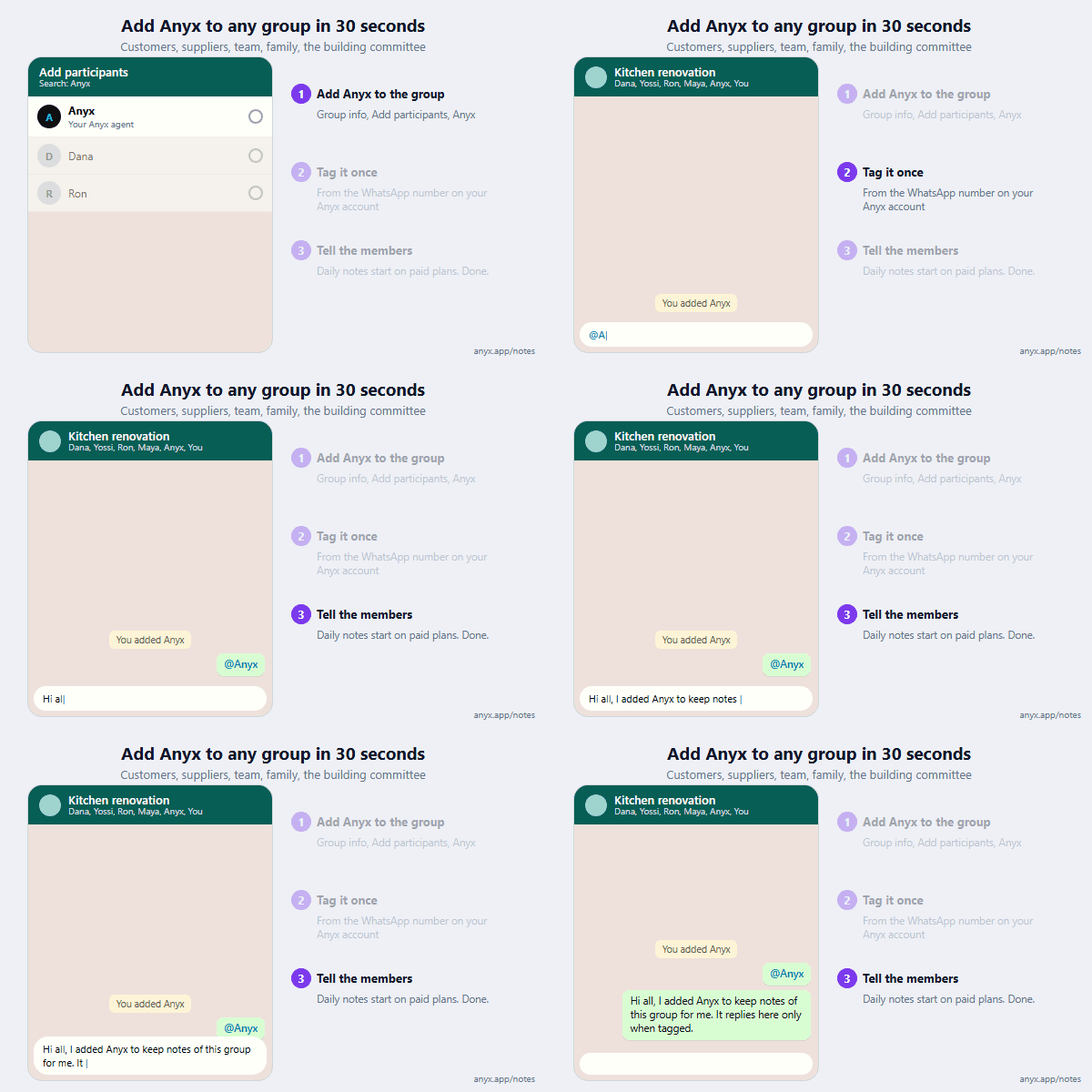
It takes about 30 seconds per group:
Add Anyx to the group
Add your Anyx agent to a WhatsApp group you manage, like any other contact.
Tag it once
In the group, type @ and pick Anyx. Send it from the WhatsApp number on your Anyx account.
Tell the members
Let the group know Anyx is there. In groups linked to Starter, Pro or Max, notes and email delivery are on by default.
Notes go to your account email every 24 hours by default. You can switch to every 6, 12 or 48 hours, or weekly, and send each group’s note to up to 5 recipients. Notes are never posted to the group. If you are unsure about adding AI to a group, read is it safe to add AI to a WhatsApp group?.
How do you tell Anyx what matters in each group?
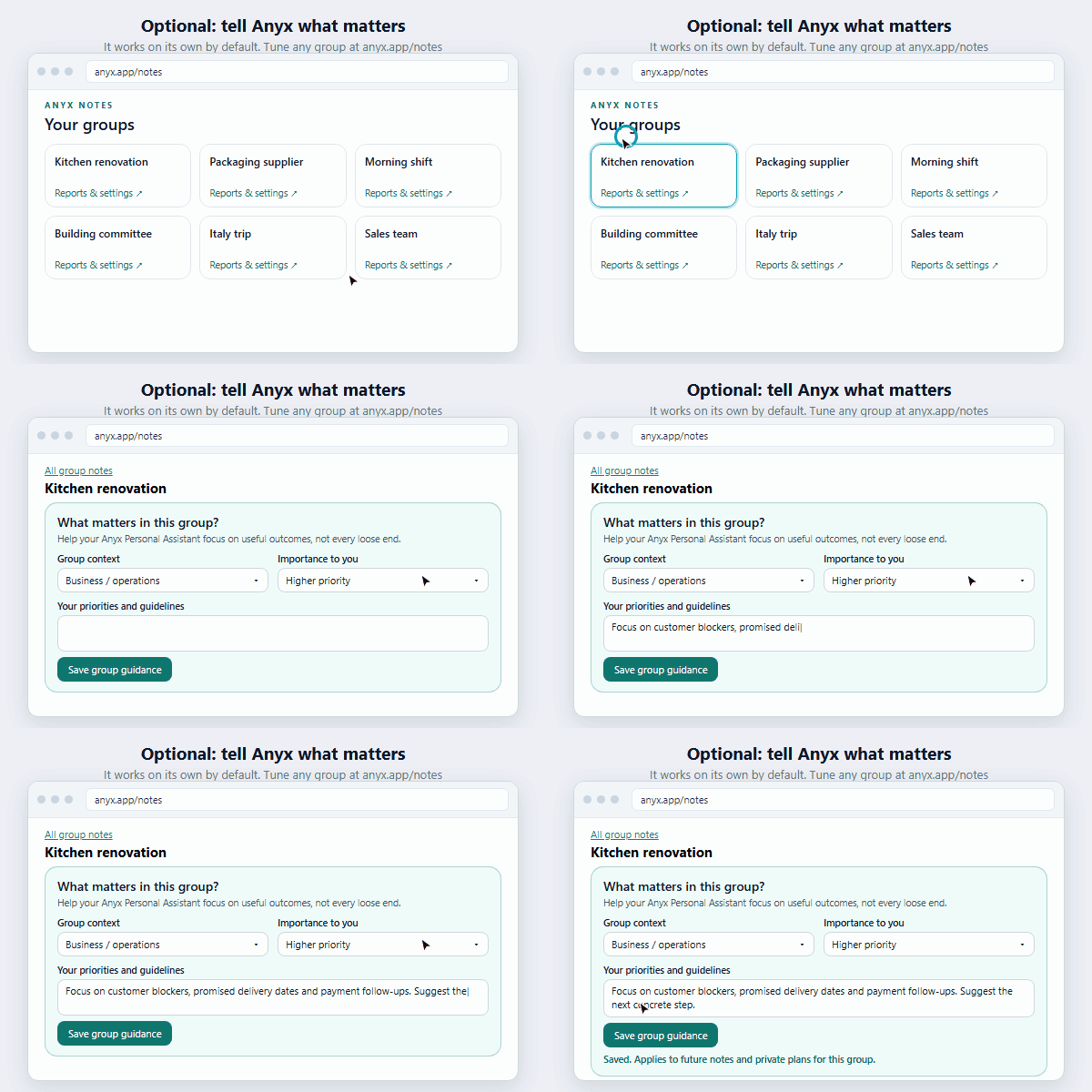
This step is optional. Anyx decides what to highlight on its own. When one group matters more, or you want it to look for something specific, open anyx.app/notes, choose the group and use the box called What matters in this group?:
- Group context: Mixed / not specified, Personal / family, or Business / operations.
- Importance to you: Normal, Higher priority or Lower priority.
- Your priorities and guidelines: up to 1,000 characters on what to focus on.
Tap Save group guidance. The settings apply to future notes for that group.
What should you write in the guidelines?
Write it like a short brief to an assistant: what you care about in this group, and what to skip. A few examples:
Focus on customer blockers, promised delivery dates and payment follow-ups. Suggest the next concrete step; avoid generic advice.
Track supplier offers, their deadlines and anything that changes our delivery dates. Flag when a price was discussed but nothing was agreed.
Focus on family commitments and practical arrangements. Ignore casual chat. Offer a short message I can send.
Here is what a note can look like when a supplier group is marked as higher priority with the second brief. The business and messages are fictional:
Needs your attention
The 8% discount for a 3-month commitment expires Friday
Why it matters: Nothing was agreed yet and the lead time is still unknown.
Suggested next step: Ask for the lead time on 5,000 units before you answer the offer.
Unanswered
What is the lead time for 5,000 units?
Worth checking
Are you negotiating price without knowing the delivery date?
28 messages in this period. Based only on captured messages.
When a note gives you more than a briefing, you can bring it into your private chat and turn it into a plan. See how to turn group noise into a clear plan.
What does this not do?
- Guidelines are not permissions. They change what Anyx focuses on. They do not authorize sending messages, scheduling or completing tasks.
- Anyx only knows what it saw. It only sees chats it is part of, and only messages from after it joined. For older history, you can import a chat export.
- Notes can still be wrong. Check important facts, amounts and dates before you act on them. A passed deadline without a message saying it was done is flagged for you to confirm, not declared unfinished.
- Members should know. Tell the group that Anyx is there. While Anyx is in a group, it stores that group’s messages.
FAQ
Do I have to set priorities for every group?
No. Anyx works on its own by default and notes start without any setup. Setting importance and guidelines at anyx.app/notes is optional, and you can do it for one group, some groups or none.
Where do I set a group’s importance and instructions?
Open anyx.app/notes, choose the group and use the box called What matters in this group?. Pick the group context and Importance to you, write your priorities and guidelines, and tap Save group guidance.
Can my instructions make Anyx send messages or act in the group?
No. Guidelines only change what Anyx focuses on and highlights in your notes. They do not authorize sending messages or completing tasks. Notes are never posted to the group, and Anyx replies in a group only when someone tags it.
How many groups can I add?
Starter covers 4 groups, Pro 30 and Max 120. AI Notes are included in all three plans, and notes with email delivery are on by default in groups linked to them.